1Business inventory
Map servers, virtual machines, workstations, Microsoft 365, line-of-business applications, file shares, databases, SaaS data, and cloud workloads.
Hotline: +1 949 777 5567
Email: Info@ITperfection.com
IT Operations & Cybersecurity Encyclopedia
A practical guide to designing backup coverage for servers, workstations, Microsoft 365, cloud data, ransomware recovery, restore testing, and executive backup reporting.
Backup Strategy
A backup strategy business networks can rely on starts with business priorities, not just backup software. The plan should identify critical systems, acceptable data loss, recovery time objectives, backup schedules, storage locations, restore procedures, encryption, monitoring, reporting, and ransomware recovery assumptions.
Map servers, virtual machines, workstations, Microsoft 365, line-of-business applications, file shares, databases, SaaS data, and cloud workloads.
Define how much data loss the business can tolerate and how quickly each system must be restored.
Decide what is protected, how often backups run, how long data is retained, and who receives backup health reports.
Rank domain controllers, file servers, finance systems, EHR/CRM systems, Microsoft 365, network services, and executive workflows.
3-2-1 Rule
The 3-2-1 backup rule is still useful, but modern business networks usually need additional controls such as immutability, isolated credentials, MFA, backup monitoring, and tested recovery procedures.
Keep production data plus at least two recoverable backup copies for critical systems and business data.
Use separate storage platforms or repositories so one storage failure does not erase every recovery option.
Maintain an offsite or cloud copy that is not dependent on the same building, storage array, or server room.
Add immutability, object lock, hardened repositories, or offline media to reduce ransomware modification risk.
Immutable Backup
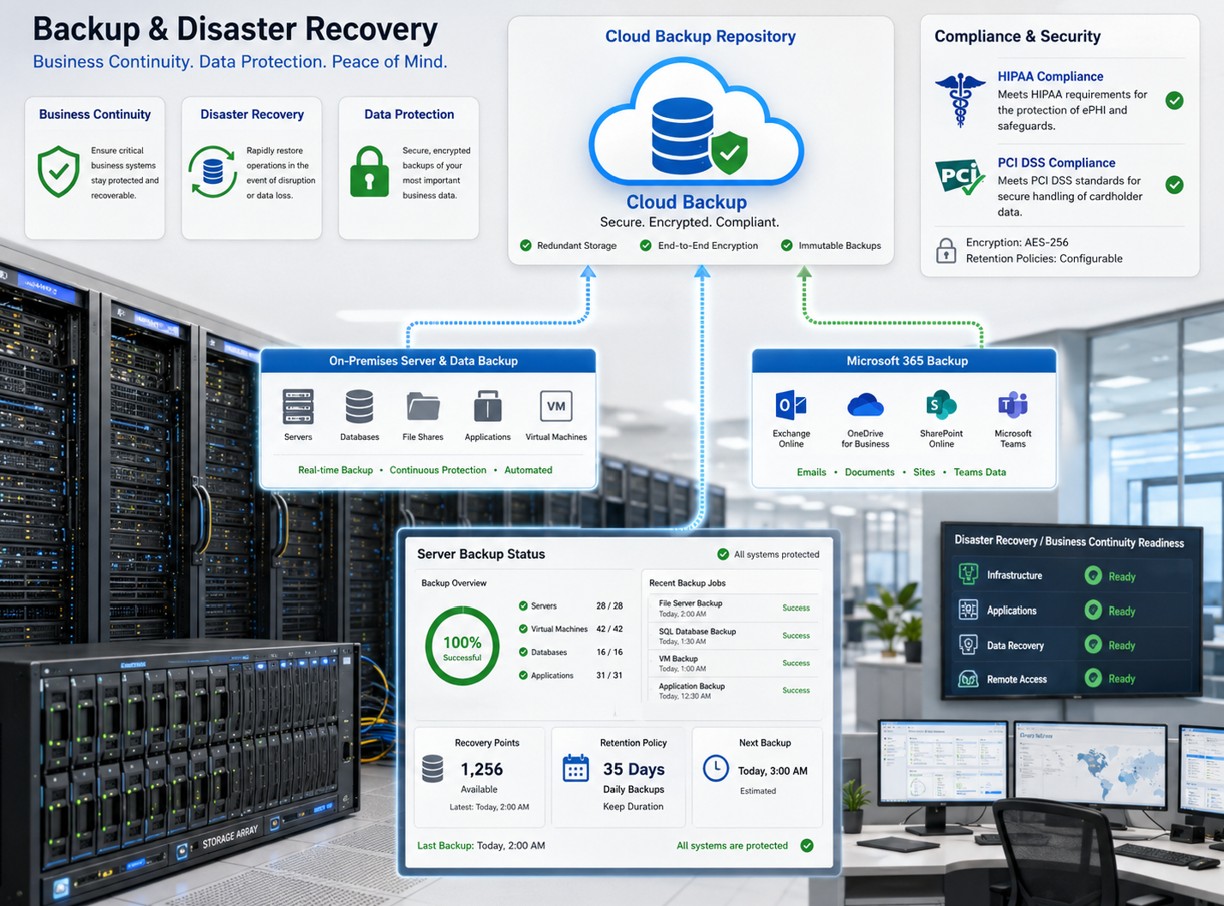
Keep server backup, cloud repository, Microsoft 365 backup, compliance controls, and restore status visible for owners and IT teams.
Microsoft 365 Backup

Review Exchange Online, SharePoint, OneDrive, Teams-related data, retention settings, backup vendor coverage, and restore expectations.
Restore Testing
| Area | What to Test | Business Question |
|---|---|---|
| File server | Restore files, folders, permissions, and prior versions. | Can staff recover work quickly without rebuilding the share from scratch? |
| Server or VM | Restore a full virtual machine, application server, or domain service in an isolated environment. | Can critical services come back within the expected RTO? |
| Microsoft 365 | Restore mailbox items, SharePoint files, OneDrive files, and Teams-related data where covered. | Can cloud data be recovered when native retention is not enough? |
| Ransomware scenario | Validate clean recovery points, credentials, documentation, and network isolation. | Can the business recover without reintroducing compromise? |
Highlighted Section
Business backups should be treated as critical security infrastructure. Backup systems need hardening, monitoring, privileged access control, encryption, immutability, vendor governance, and repeatable restore testing.
Authoritative references: CISA StopRansomware, CISA Ransomware Guide, NIST Cybersecurity Framework, NIST contingency planning guidance, Microsoft Azure Backup documentation, Microsoft 365 Backup documentation, Veeam hardened repository documentation, and Veeam 3-2-1-1-0 guidance.
Business Impact
Monthly Checklist

Ali Hassani
Ali Hassani, CISO, brings 25+ years of IT infrastructure, cybersecurity, Microsoft, network, server, backup, disaster recovery, and compliance-focused operations experience. For backup strategy projects, Ali helps business owners and IT teams connect technical backup settings with practical recovery expectations.
His background includes CISSP, CCISO, CCNP, CCNA, MCSE, MCSA Security, MCITP, MCP, and MCTS credentials, with experience across server operations, Microsoft environments, network infrastructure, monitoring, ransomware recovery planning, and executive reporting.







FAQ
A business backup strategy defines what data is protected, where backups are stored, how often they run, how long they are retained, how fast systems must be restored, and how recovery is tested.
The 3-2-1 rule means keeping three copies of data, on two different storage types, with one copy offsite. Modern strategies often add immutability or offline protection.
Immutable backups help prevent backup data from being changed or deleted during ransomware or administrator-account compromise, giving the business a cleaner recovery option.
Microsoft 365 includes retention, versioning, and recovery features, but many businesses still need separate backup planning for business continuity, restore expectations, reporting, and recovery testing.
Restore testing should happen on a scheduled basis and after major infrastructure changes. Monthly spot checks and periodic full recovery exercises are practical for many businesses.
Yes. IT Perfection can help review backup job health, repository capacity, restore testing, Microsoft 365 coverage, ransomware recovery gaps, and executive reporting.
IT Perfection can help review backup coverage, Microsoft 365 backup needs, immutable storage, restore testing, ransomware recovery planning, and executive reporting for business networks in Orange County and Southern California.