
Clear priorities
Separate urgent support risks from important planning items so owners and IT teams know what should happen first.
Create a practical technology plan for the next 30, 60, 90 days and the next 12 months. ITperfection helps business owners organize Microsoft 365, Azure, servers, networks, backups, endpoint lifecycle, documentation, vendor renewals, budget planning, and operational improvements into a clear roadmap.
Technology Planning
Many businesses know they need better technology planning, but the work is spread across old computers, Microsoft 365 changes, backup questions, server upgrades, network performance, software renewals, vendor contracts, documentation gaps, and budget timing.
ITperfection helps businesses in Irvine, Orange County, Los Angeles County, and Southern California create an owner-friendly IT roadmap that connects near-term priorities with longer-term technology improvements.
Separate urgent support risks from important planning items so owners and IT teams know what should happen first.
Plan renewals, lifecycle replacements, projects, and cloud costs before they become surprise expenses.
Translate technical findings into business-friendly next steps, timelines, and decision points.
Common Planning Problems
Purchases happen after equipment fails, licenses expire, or users complain instead of following a planned lifecycle.
Owners and internal teams know improvement is needed, but the next 30, 60, and 90 days are not organized into practical steps.
Microsoft 365, Azure, backup, endpoint, and vendor renewals grow over time without a business-aligned review.
Servers, networks, backup dependencies, vendors, contracts, and replacement dates are not documented well enough for planning.
Technology renewal costs, device replacement needs, cybersecurity improvements, and infrastructure projects appear late in the year.
Microsoft 365, Azure, endpoint, backup, server, and network work are handled separately instead of in one roadmap.
Services Provided
Review Microsoft 365, Azure, servers, networks, backups, endpoints, documentation, vendors, and recurring operational concerns.
Separate urgent fixes, near-term stability work, budget-sensitive projects, and improvements that can be phased over time.
Create short-term priorities that owners and IT teams can actually follow, measure, and adjust.
Build a practical year-ahead plan for projects, renewals, lifecycle, cloud, network, backup, and documentation improvements.
Map likely costs, renewal windows, replacement needs, and project phases so technology spending is easier to explain and approve.
Identify aging computers, servers, network equipment, software, warranties, licenses, and support dependencies.
Plan Microsoft 365, Azure, identity, backup, storage, and license improvements around business needs.
Review server, switch, firewall, Wi-Fi, internet, VPN, and site connectivity needs for reliability and growth.
Review backup coverage, recovery priorities, Microsoft 365 backup expectations, and practical recovery gaps.
Track renewals, contracts, license changes, warranties, and vendor responsibilities before they become urgent.
Improve records for systems, ownership, renewals, lifecycle status, project notes, and operational handoff.
Provide a business-friendly summary owners can use for budget discussions, priorities, and decision-making.
Planning Views

Start with current operations, documentation, pain points, and recurring support risks.

Review licensing, cloud cost, renewal timing, and project phases before approvals are needed.

Include backup coverage, recovery expectations, and Microsoft 365 protection in the plan.

Plan server, network, Wi-Fi, internet, firewall, and infrastructure work around business needs.
Roadmap Workflow
Review current systems, vendors, renewals, documentation, pain points, and existing business priorities.
Sort findings into urgent, 30-day, 60-day, 90-day, and later roadmap items.
Identify budget ranges, renewal timing, licensing changes, replacement needs, and likely project effort.
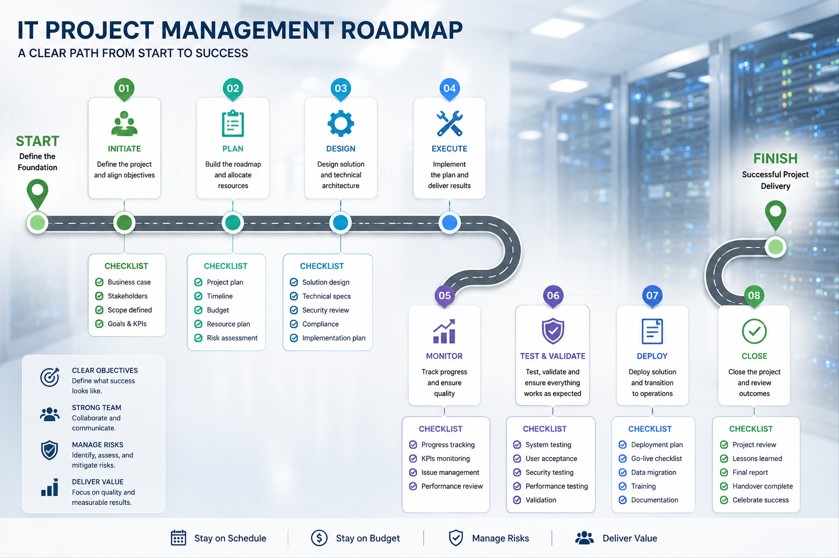
Build a 12-month roadmap that connects Microsoft 365, Azure, endpoint, backup, server, and network work.
Walk through the plan with owners, managers, or internal IT so priorities are clear and realistic.
Adjust the roadmap as business needs, risks, projects, staffing, and budgets change.
Deliverables
Who This Is For
Before And After
| Without an IT roadmap | With a practical IT roadmap |
|---|---|
| Renewals, projects, and replacements appear unexpectedly. | Renewals, lifecycle needs, and likely projects are visible ahead of time. |
| Microsoft 365, Azure, backup, network, and endpoint work are planned separately. | Technology work is grouped into a connected 30/60/90-day and 12-month plan. |
| Owners see technical problems but not clear business priorities. | Owners receive an executive summary with practical next steps and budget context. |
| Documentation gaps make support and planning harder. | Documentation improvements are included as part of the roadmap. |
Local Service Area
ITperfection helps businesses create practical IT plans for Microsoft 365, Azure, endpoint lifecycle, backup, servers, networks, documentation, vendor renewals, and budget planning across Southern California, Los Angeles County, and Orange County cities including:
Related Resources
For formal cybersecurity audits, security risk reviews, or compliance-focused planning, OC Security Audit can help.

Expert Consultant
Ali Hassani brings 25+ years of IT, Microsoft infrastructure, cloud, network, cybersecurity, compliance, and operations experience to IT roadmap planning. He helps owners connect technical priorities with business timing, budget discussions, lifecycle decisions, and operational risk.
For roadmap planning, Ali can help review Microsoft 365, Azure, servers, networks, backup, endpoint lifecycle, vendor renewals, documentation, and practical security-minded operations.







FAQ
An IT roadmap is a practical plan that organizes technology priorities, projects, renewals, lifecycle needs, cloud improvements, backup planning, documentation, and budget expectations into a usable timeline.
ITperfection reviews the current environment, identifies priorities, creates 30/60/90-day recommendations, builds a 12-month technology plan, and provides an executive summary with practical next steps.
Yes. ITperfection can include Microsoft 365, Azure, identity, storage, backup, licensing, endpoint management, and cloud improvement planning as part of the roadmap.
Yes. The roadmap can include budget planning notes for renewals, replacement cycles, projects, licenses, cloud services, backup, and infrastructure improvements.
No. IT roadmap planning is useful for small businesses, owners, office managers, internal IT teams, and co-managed IT environments.
ITperfection includes security-minded operational planning such as backup, lifecycle, endpoint, cloud, network, and documentation priorities. For formal cybersecurity audits or compliance assessments, ITperfection may recommend OC Security Audit.
If your technology priorities, renewals, lifecycle needs, cloud plans, backups, and budget decisions feel scattered, ITperfection can help organize them into a clear plan.
We use necessary cookies and limited analytics and advertising-measurement cookies. Select Accept to allow optional cookies or Deny to continue with necessary cookies only. No name or email is required. You may close this website at any time.
