
1Retention tiers
Separate daily, weekly, monthly, and pre-change restore points based on update frequency and business tolerance for data loss.
IT Operations & Cybersecurity Encyclopedia
Learn how to design WordPress backup retention policies for files, databases, staging, malware recovery, hosting backups, and business continuity.

Backup Retention
A WordPress backup retention policy defines how many restore points exist, where they are stored, how long they are kept, who can access them, and how quickly the site can be recovered.
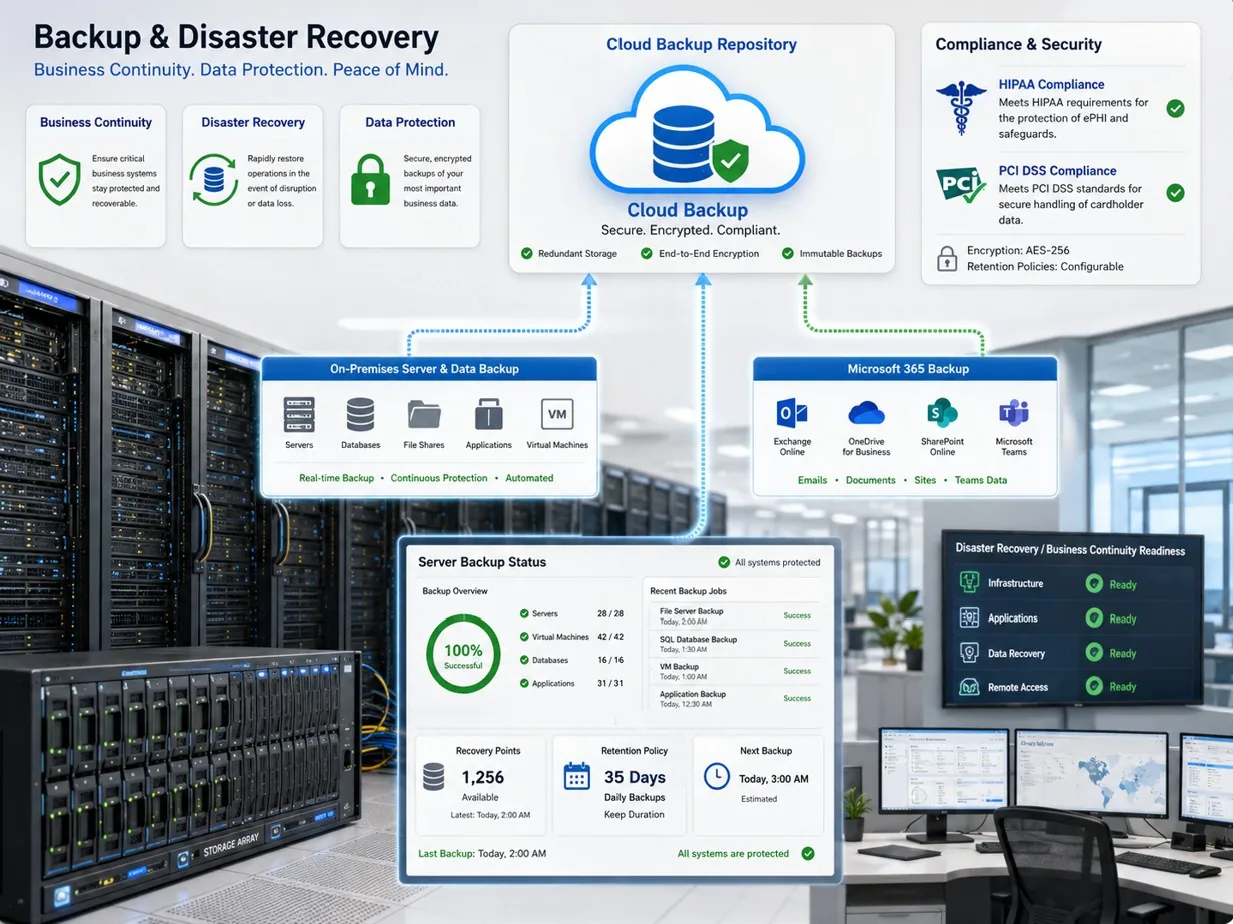
Separate daily, weekly, monthly, and pre-change restore points based on update frequency and business tolerance for data loss.
Back up uploads, themes, plugins, custom code, configuration, and database records together.
Protect backup storage with encryption, MFA, access review, and offsite copies where the site compromise cannot delete every restore point.
Document restore tests, recovery time, missing assets, DNS or cache steps, and user acceptance after recovery.
File Backups
File backups preserve uploads, themes, plugins, custom code, security rules, and media assets that database-only exports cannot restore.
Retention should account for slow-discovered issues such as deleted media, malicious file changes, abandoned plugin cleanup, and accidental template edits.
Large media libraries need storage planning so backup cost does not quietly force teams to shorten retention too much.
Database Backups
Database backups preserve content, users, orders, form submissions, settings, redirects, and plugin data.
Busy ecommerce, membership, booking, and healthcare-adjacent sites may need more frequent database restore points than brochure websites.
Retention should consider how long malware, bad imports, or mistaken deletions might remain unnoticed.
Restore Testing
Restore testing proves that backups are usable and that the team understands the steps before an emergency.
A restore test should verify files, database, login, forms, SSL, redirects, cache, WAF behavior, SEO settings, and key pages.
Testing should be performed in staging or a controlled recovery location instead of replacing production casually.
Malware Recovery
Malware recovery needs restore points that predate infection and a cleanup process that prevents reinfection.
Restoring yesterday’s backup may restore the attacker’s backdoor if the compromise started weeks earlier.
Backup retention should include older recovery points, malware scan evidence, password rotation, plugin patching, and WAF review.
Highlighted Guidance
Keep at least one backup path outside the production hosting account so site-level compromise cannot erase every copy.
Protect backup files because they may contain database records, uploaded documents, email addresses, and configuration secrets.
Use immutable or locked retention where appropriate for ransomware and destructive admin-account scenarios.
Understand overlap and gaps between host snapshots, backup plugins, manual exports, and cloud storage copies.
Create named restore points before major plugin, theme, PHP, DNS, CDN, or content migration work.
Keep step-by-step recovery notes with owners, credentials location, validation checks, and escalation contacts.
Authoritative references: WordPress backupsCISA StopRansomwareNIST CSFWordPress hardeningCloudflare cache
Business Impact
Monthly Review
Related Resources

Ali Hassani, CISO
Ali Hassani is a CISO, cybersecurity and IT consultant, and IT infrastructure leader with 25+ years of experience in cybersecurity, compliance, Microsoft environments, network security, managed IT, and business technology operations; his certifications include CISSP, CCISO, CCNP, CCNA, MCSE, MCSA Security, MCITP, MCP, and MCTS.



Related validation tools
After reviewing this IT Perfection guide, administrators can use these OC Security Audit resources to validate the same control areas from a security, audit-readiness, or risk-review perspective.
Use this to validate backup coverage, restore testing, immutable backups, disaster recovery evidence, and recovery objectives.
Use this to review control maturity, audit evidence, policy/process gaps, and compliance readiness across major frameworks.
These tools are for initial guidance only and do not replace a professional cybersecurity audit, compliance assessment, penetration test, or legal/compliance review.
FAQ
Retention depends on site change rate, compliance expectations, malware detection delay, and recovery objectives; many businesses need more than a few daily copies.
Sometimes they help, but businesses should understand retention limits, restore scope, access controls, and whether offsite copies exist.
Restore testing confirms that files, database, credentials, DNS, cache, SSL, and business workflows can actually recover when needed.
For WordPress Backup Retention Policy Guide, IT Perfection can turn the checklist above into page-specific assessment notes, prioritized remediation, vendor coordination, and recurring maintenance evidence for Southern California businesses.
Technical quality addendum
This section adds source-backed administrator guidance for WordPress Backup Retention. Use it to separate practical capabilities from limitations, licensing dependencies, monitoring gaps, and evidence that should be collected before a configuration is considered reliable.
Validate retention by restore objective, legal hold, malware dwell time, offsite copy, immutable storage, and the business systems represented in each backup set.
Strong implementations give IT teams clearer ownership, faster troubleshooting, better change evidence, and cleaner audit trails because configuration state, alert routing, and exception handling are visible.
A retention policy is incomplete until restore testing proves that the exact website, database, media library, plugins, and configuration can be recovered. Check licensing, edition support, log-retention limits, API availability, administrative role requirements, false-positive risk, and business-process exceptions before recommending enforcement.
Keep current exports, dashboard screenshots, policy names, change tickets, test results, alert examples, owner approval, rollback notes, and exception expiration dates. That evidence is what turns guidance into a managed control.
WordPress backup retention should define database, files, media, theme, plugin, offsite copies, immutability, restore testing, storage cost, and incident recovery requirements.
Document owners, settings, user access, dependencies, logs, backups, exceptions, and validation evidence before changing production.
Use staging, controlled tests, log review, screenshots, rollback notes, and owner acceptance so changes are safe and repeatable.
Review after incidents, plugin or hosting changes, vendor changes, audits, high-risk updates, and monthly maintenance cycles.
These risks should be checked before the website control is treated as secure or reliable.
Weak website controls can expose customer, lead, staff, or operational data.
Broken updates, DNS errors, caching mistakes, and malware can take business pages offline.
Spam pages, warnings, redirects, and slow pages can hurt credibility and SEO.
Missing logs, backups, and evidence make recovery slower.
Access, retention, change, and data-handling evidence may be requested.
Reactive cleanup takes longer than controlled maintenance.
Useful primary references: WordPress backups, NIST contingency planning, CISA ransomware guide. Related support: IT Perfection managed IT services, IT Perfection cybersecurity support, Ali Hassani profile, and contact IT Perfection.
We use necessary cookies and limited analytics and advertising-measurement cookies. Select Accept to allow optional cookies or Deny to continue with necessary cookies only. No name or email is required. You may close this website at any time.
